
- How does QR‑based production control work?
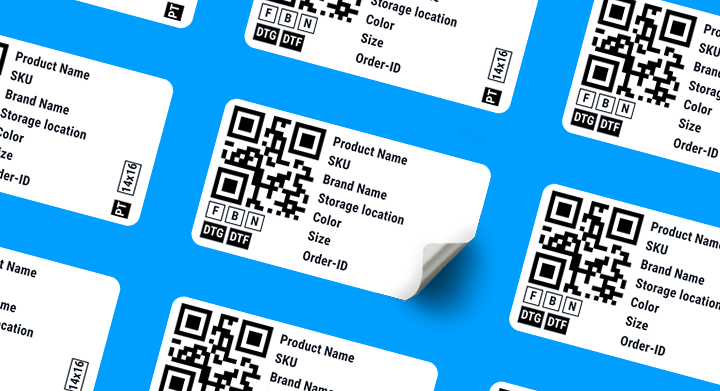
Myze generates QR labels for each job or item. Scanning ensures correct routing and full traceability.
- Why must products exist both in the designer and in Myze?
Designers need products for previews. Myze needs products for workflow handling. Stock stays in the webshop; production logic stays in Myze.
- How does the DTF workflow integration work?
Myze sends artwork to Cadlink, where files are automatically nested for efficient film usage.
- Why is there an order fee?
The fee ensures fair scaling for high‑volume users and allows unlimited shop connections and unlimited monthly orders.
- How does Myze handle shipping?
Once production is complete, Myze can create shipping labels through Sendcloud, including pickup configuration.
- How flexible is Myze for different production styles?
Myze supports structured scan‑based flows and flexible bulk workflows depending on team preferences.
From order to parcel made easy.
No WhatsApp groups, no spreadsheets, no mistakes. Myze manages your entire textile production.
See how the Myze workflow runs, what an example production looks like, and which hardware you actually need. In three steps.
Step 1 · How it works
One workflow. From receipt to shipment.
Every order runs through the same four steps – automatically, without manual data transfer.
The principle
One QR code carries the order through the whole shop floor
The label's QR code is the order – motif, method, size, position. Your team scans it at every station: Myze sends the right file to the right machine and logs each step. Nobody looks anything up or asks around.
Who does what
Per step: what Myze handles, and what your team actually touches.
01
Order received
Shopify, WooCommerce, Etsy or API.
MyzePulls it in, reads motif, size and method
YouNothing – no copying, no re-typing
→ Station 1
02
Picking list & label
Orders are bundled into batches by colour and size.
MyzeBuilds the batch, prints labels and pick list
YouPick garments, attach labels
→ Station 1
03
Scan stations
Every station starts with a scan.
MyzeRoutes the file, logs the step, flags errors
YouScan, place, press start
→ Stations
234567
04
Shipping
Complete orders are packed and shipped.
MyzeCreates the label via Sendcloud, returns tracking to the shop
YouPack, hand to the carrier
→ Station 8
So much for the theory. Here is what that looks like in a real hall.
Step 2 · Example production
Book a demo
The same workflow, on your shop floor
Those four steps become eight physical stations. This floor plan shows an example setup – with the hardware needed at each one. Tap any station to see what it does and what it needs.
Smaller production? No problem.
Use Myze in Quick Production View with your existing setup — no additional equipment required.
Step 3 · What you need
Eight stations. Two PC classes. Four devices.
Nothing exotic: every station runs on standard Windows hardware and a QR scanner. Only picking & batch needs more power for print file creation. Here is the complete list.
The PC classes at a glance
Two device classes cover the entire microfactory. The standard PC is enough at most stations – only picking & batch needs workstation performance.
Standard PC
For stations 2, 3, 4, 5, 6, 7 and 8
Minimum requirements
CPU benchmark (PassMark CPU Mark): ≥ 10,000
RAM: 16 GB
Mass storage: SSD
Recommended
CPU benchmark (PassMark CPU Mark): ≥ 18,000
RAM: 32 GB
Mass storage: NVMe SSD
Workstation PC
For station 1 – picking & batch (print file creation)
Minimum requirements
CPU benchmark (PassMark CPU Mark): ≥ 25,000
RAM: 32 GB
Mass storage: NVMe SSD
Recommended
CPU benchmark (PassMark CPU Mark): ≥ 35,000
RAM: 64 GB or more
Mass storage: NVMe SSD
Our hardware recommendations
Proven devices and consumables to get started – label printers and labels are available directly from Brother BIMH.
QR label printer
Brother TD-4420TN
Thermal transfer label printer for heat-resistant labels. Available directly from Brother BIMH.
Article number: ZTD4420TN21
Consumables
Heat-resistant labels
Matching labels and thermal transfer ribbon for the TD-4420TN. Available directly from Brother BIMH.
N00002319 – labels
N00002318 – thermal transfer ribbon
N00002318 – thermal transfer ribbon
QR scanner
QR code scanner
Any kind of scanner; German/European languages can be configured via the scanner settings.
Budget (wired): Tera Pro 2D QR Desktop Barcode Scanner 9100
Premium (wireless, for station 5): Zebra DS2278
Premium (wireless, for station 5): Zebra DS2278
Shipping
Brother shipping label printer & labels
Many Brother models available for printing shipping labels.
Recommendations: TJ-4020TNZT · TJ-4420TNZT
Labels: BUS-1J150102-203 · BSP-1D300-110
Labels: BUS-1J150102-203 · BSP-1D300-110
Your hall, your layout
This was one example. Soon you will be able to enter the dimensions of your own production here – and Myze will suggest the right stations for you to place freely on your floor plan. Until then, we are happy to walk you through the setup in person.
#myzeappmyze.app
Legal notice: All information, layouts and hardware recommendations on this page and in the PDF downloads provided are based on practical experience from example production setups and are provided for general guidance only. They do not constitute any warranty of condition or compatibility. No guarantee is given as to the suitability, compatibility, availability or currency of the products, article numbers and specifications mentioned; the information provided by the respective manufacturers shall prevail. Product and brand names mentioned are the property of their respective owners. Please verify the requirements of your specific use case before purchasing – we are happy to advise you. Errors and changes excepted. Last updated: July 2026.
Frequently Asked Questions.
Analytics, Workflow & E-Commerce for
DTG, DTF, Embroidery, Sublimation and Stock-Products
